Illustrated Tutorial: Install Microsoft's official TokenEconomizer in three minutes to let your coding agent automatically save money图文教程:三分钟装上微软官方 TokenEconomizer,让编码 Agent 自动省钱
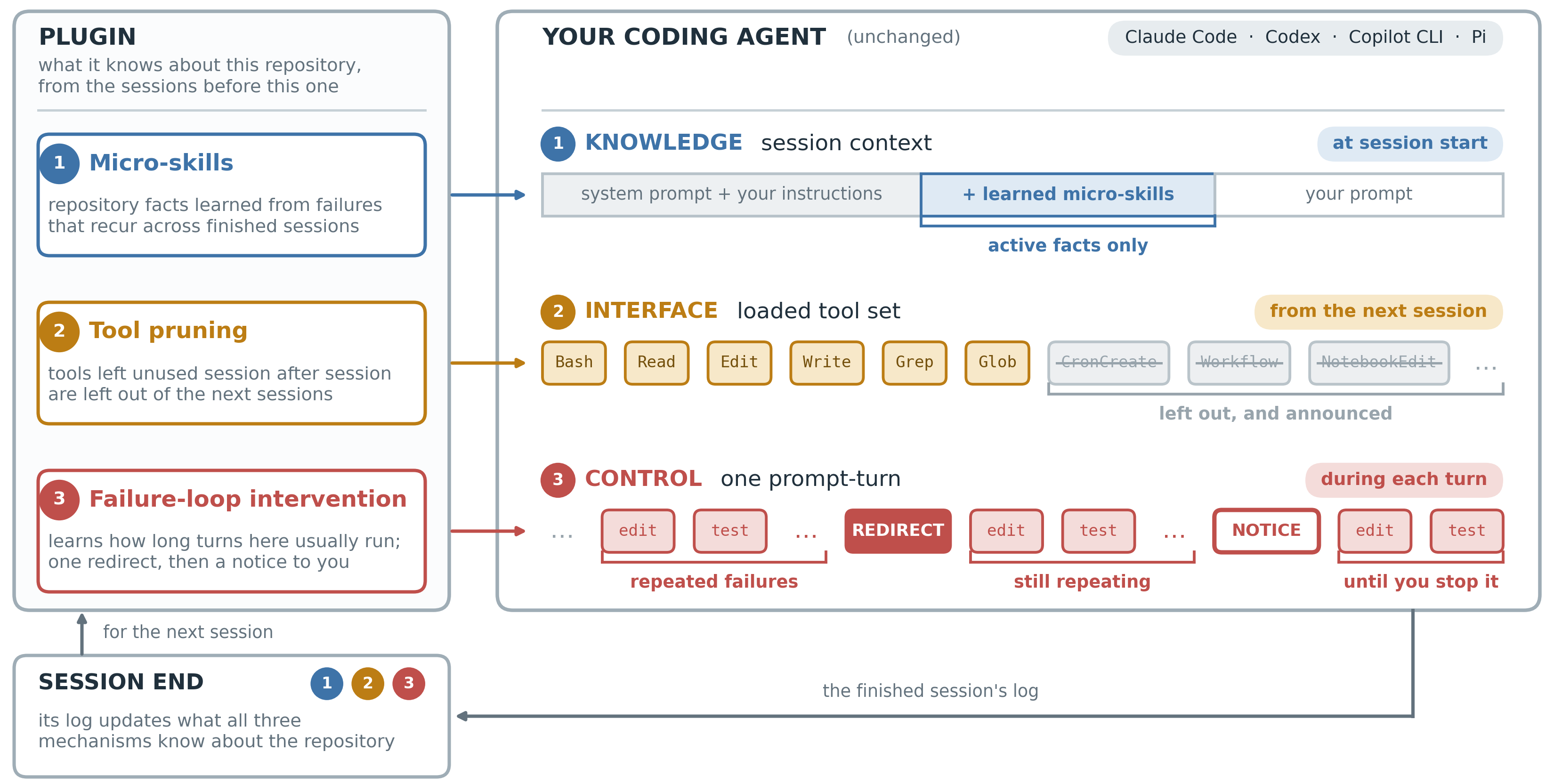
Follow these steps: Extract the plugin source code package → Register with Claude Code using three commands → Open the import for historical sessions → Understand the status report → Adjust parameters as needed. Requires Python 3.10+. Supports Claude Code, Codex, GitHub Copilot CLI, and Pi. No API key required at any point.
跟着做一遍:解压插件源码包 → 三条命令注册进 Claude Code → 打开历史会话导入 → 看懂 status 报告 → 按需调参。需要 Python 3.10+,支持 Claude Code、Codex、GitHub Copilot CLI 与 Pi,全程无需任何 API Key。
Step 1: Prepare the environment and source code package第一步:准备环境与源码包
Download the TokenEconomizer source code package from this site (see the button above) and extract it to a directory that will be retained long-term – the plugin runs directly from the cloned directory and cannot be deleted after installation. In the terminal, run python --version to confirm that you have version 3.10 or higher; confirm that your Claude Code version is between 2.1.300 and 2.1.310 (older versions are not supported).
The plugin does not require any API key: its model calls use your Agent's original subscription or login, and all the learned data is stored locally in the ~/.tokeneconomizer directory.
从本站下载 TokenEconomizer 源码包(见上方按钮)并解压到一个长期保留的目录——插件从克隆目录直接运行,装完不能删。终端执行 python --version 确认 3.10 或更高;确认你的 Claude Code 版本在 2.1.300–2.1.310 区间(旧版本不支持)。
插件不需要任何 API Key:它的模型调用走你 Agent 本来的订阅或登录,学到的数据全部存本机 ~/.tokeneconomizer 目录。
Step 2: Add three commands to Claude Code第二步:三条命令装进 Claude Code
Open a terminal in the parent directory of the extracted folder and execute the following commands in sequence: git clone https://github.com/microsoft/TokenEconomizer.git (or directly use the extracted folder from this site) → claude plugin marketplace add "absolute path of this directory" → claude plugin install tokeneconomizer@tokeneconomizer.
Launch Claude, trust the current folder, and run /tokeneconomizer:status (the first time, you will be asked to allow the script to run; select "Allow"). When you see the status block output, the installation is successful. Each machine also needs to run /tokeneconomizer:toolprune refresh-catalog once, so that the tool pruning feature can recognise all the tools in your environment.
The corresponding commands for Codex users are codex plugin marketplace add and codex plugin add. After installation, select Trust all and continue under Hooks need review. After exiting and re-entering, verify with $tokeneconomizer:status. For the commands for Copilot CLI and Pi, see the corresponding sections in the README within the package.
在解压目录的上一级打开终端,依次执行:git clone https://github.com/microsoft/TokenEconomizer.git(或直接用本站解压出的目录)→ claude plugin marketplace add "本目录绝对路径" → claude plugin install tokeneconomizer@tokeneconomizer。
启动 claude,信任当前文件夹,运行 /tokeneconomizer:status(首次会请求允许执行脚本,选允许)。看到状态块输出即安装成功。每个机器还要跑一次 /tokeneconomizer:toolprune refresh-catalog,让工具裁剪认识你环境里的全部工具。
Codex 用户对应命令为 codex plugin marketplace add 与 codex plugin add,装完在 Hooks need review 选 Trust all and continue,退出重进后用 $tokeneconomizer:status 验证;Copilot CLI 与 Pi 的命令见包内 README 对应小节。
Step 3: Enable history import to make old conversations active as well第三步:打开历史导入,让老会话也生效
History import is disabled by default, but the plugin only reads history when "no conversations have been learned from this repository yet", so you should enable it immediately after installation: /tokeneconomizer:config set history_import=on --global. After that, the first session for each repository will read the previous session history of that repository in the background (purely local parsing, no model calls).
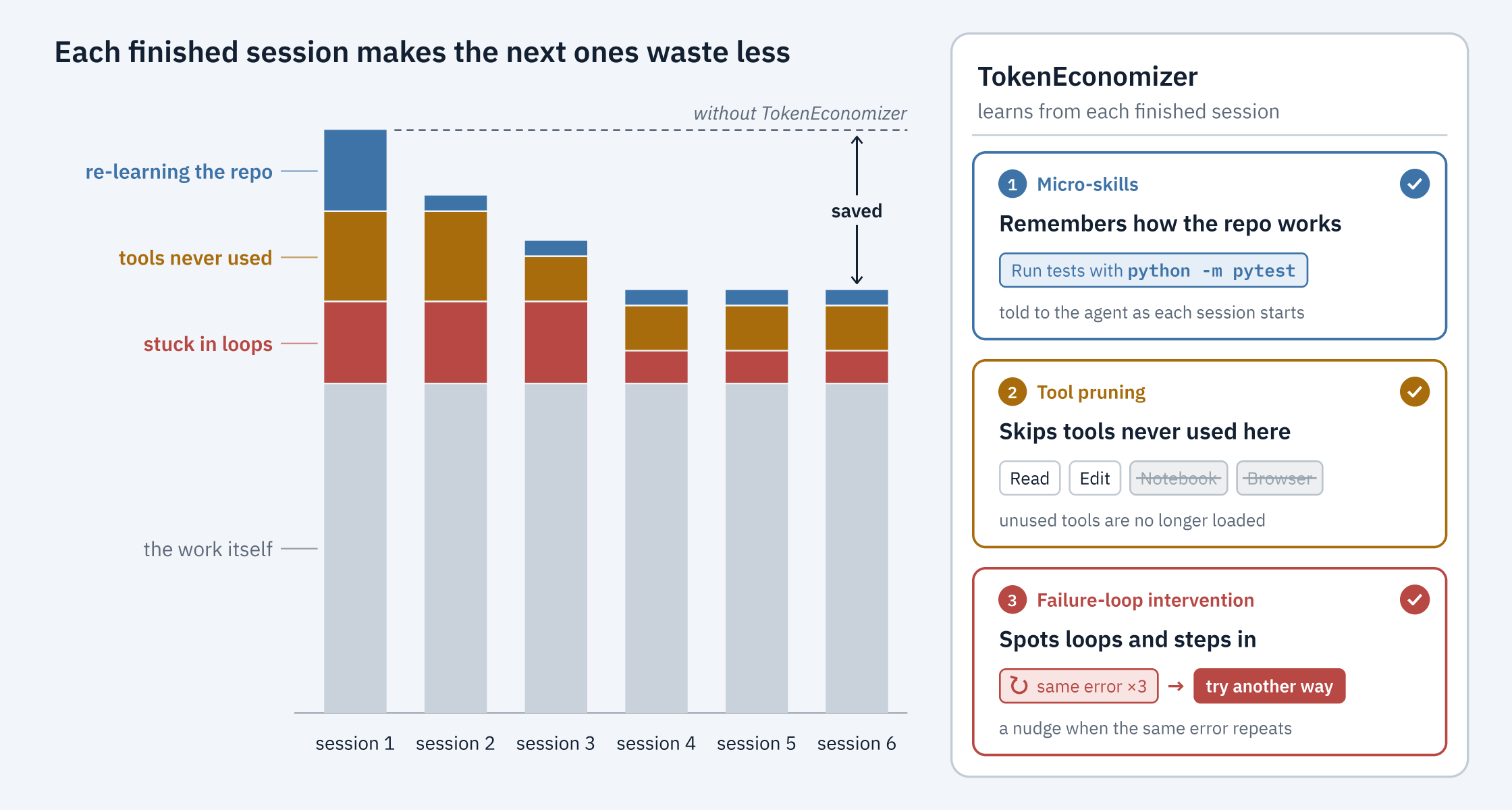
After a few sessions, use /tokeneconomizer:status to see the results: what repository facts it has learned, which tools it has cut, how many failed loops it has intercepted, and how much each session cost – the savings are clear at a glance.
历史导入默认关闭,但插件只在「还没从这个仓库学过任何会话」时才读历史,所以装完要立刻开:/tokeneconomizer:config set history_import=on --global。之后每个仓库的第一次会话会在后台读取该仓库以前的会话记录(纯本地解析,无模型调用)。
跑完几次会话后用 /tokeneconomizer:status 查看战果:它学到了哪些仓库事实、裁掉了哪些工具、拦截过几次失败循环、每个会话花了多少钱——省钱数字一目了然。
Step 4: Adjust participation and troubleshoot as needed第四步:按需调参与排障
Each of the three mechanisms has its own switch: config set microskills=on turns on micro-skills (off by default, because extracting facts requires tuning the model more); toolprune=propose only makes pruning proposals without taking action; it only takes effect after confirmation with toolprune apply. If you want to turn all of them off for a single session, simply add the environment variable TE_DISABLE=1 when starting.
Tools that are incorrectly pruned can be restored with the single command /tokeneconomizer:toolprune restore, and they will not be pruned again. If blocking is too frequent, you can adjust loopguard_nudges=2. If any part of the plugin fails, it will be silently downgraded and the conversation will continue as normal – in the worst-case scenario, it's as if the plugin isn't installed.
三个机制各有开关:config set microskills=on 打开微技能(默认关,因为提炼事实要多调模型);toolprune=propose 只出裁剪提案不动手,确认后 toolprune apply 才生效;单次会话想全部关掉,启动时加环境变量 TE_DISABLE=1 即可。
误裁的工具用 /tokeneconomizer:toolprune restore 一条命令找回,且不会被再次裁剪;拦截太频繁可调 loopguard_nudges=2。插件任何部分出错都会静默降级,会话照常进行——最坏情况等于没装。
Verify cost-saving results验证省钱效果
After using five full sessions in the same repository, a comparison of the cost records in the status shows that the official SWE-Bench tests achieve an average saving of 18.4%–30.9%. The source code package accompanying this article can be found via the download button above.
固定在同一个仓库用满五次会话后对比 status 里的成本记录,官方 SWE-Bench 实测平均省 18.4%–30.9%。本文配套源码包见上方下载按钮。
想马上用起来?去「AI工具」栏挑一个直接下载,或在「AI教程」里跟着图文步骤做一遍。
去 AI工具 → 看 AI教程 →阅读与点赞数据保存在你的浏览器本地,欢迎留下你的想法。
 今日正能量学一点,用一点;今天种下的种子,会长成明天的能力。去免费下载专区 →广告
评论 文明发言,让讨论更有价值