Nanobrowser: Put an entire AI team into the browser sidebar (open source and free)Nanobrowser:把一整支AI小分队塞进浏览器侧边栏(开源免费)
It is not a sidebar that only chats, but splits the "researcher, executive, and checker" into multiple roles: one is responsible for browsing the page to find information, the other is responsible for comparing and organizing, and finally it is up to you to make the final decision. It is completely open source and comes with its own browser plug-in. You can run it with your own API Key and can also connect to local Ollama.
它不是一个只会聊天的侧边栏,而是把「研究员、执行员、核对员」拆成多个角色分工干活:一个负责逛页面找信息,一个负责对比和整理,最后由你拍板。完全开源、自带浏览器插件形态,用自己的 API Key 就能跑,也能接本地 Ollama。

Why it’s worth pretending: An AI assistant that works alone cannot do multi-step tasks?为什么值得装:单打独斗的AI助手,干不了多步骤的活
The most annoying thing about using a browser for daily research is to move it back and forth: open ten tabs, copy and paste into the chat box, and then let it be summarized. Nanobrowser's approach is to leave this process in the browser.
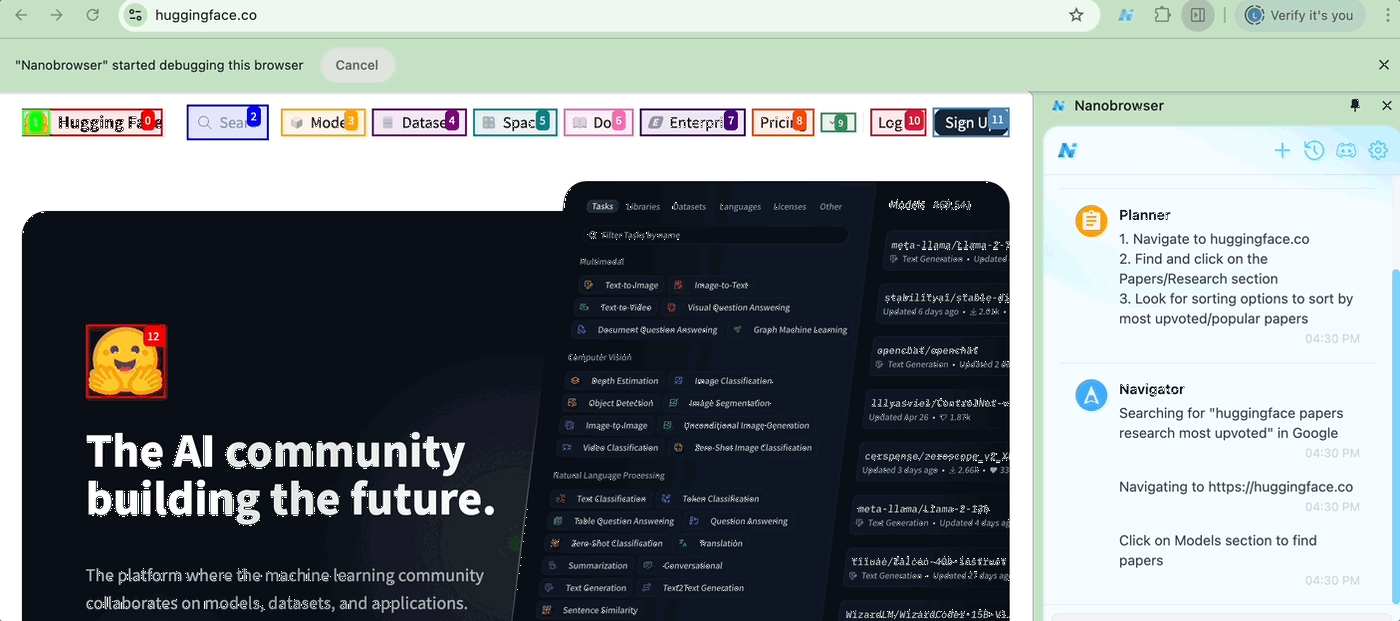
It splits the task into multiple roles: the planner is responsible for splitting "Help me compare these three mechanical keyboards" into several sub-steps, the viewer is responsible for reading information page by page, and the executor is responsible for operating the page. Each role shares the same task context, and is finally summarized into a conclusion for you.
Unlike the cloud web assistant, the plug-in uses the model key you fill in yourself: OpenAI, Anthropic, or Gemini are all acceptable. It can also point to the local Ollama model, and the data does not exit the local machine.
日常用浏览器做调研,最烦的是来回搬运:打开十个标签页、复制粘贴到聊天框、再让它总结。Nanobrowser 的做法是把这套流程留在浏览器里完成。
它把任务拆给多个角色:规划者负责把「帮我比一下这三款机械键盘」拆成若干子步骤,浏览者负责逐个页面读取信息,执行者负责操作页面。各角色共享同一份任务上下文,最后汇总成一份结论给你。
和云端网页助手不同,插件用你自己填的模型密钥:OpenAI、Anthropic、Gemini 都行,也可以指向本地 Ollama 模型,数据不出本机。
Three real-life scenarios三个真实用得上的场景
Price comparison and model selection: Given a list (such as five candidate models), let it open the product pages one by one, grab the price, parameters, and ratings, and finally output a comparison table.
Batch information collection: List the items to be checked and let them retrieve them one by one at the designated site and organize them into a structured list, eliminating manual page turning.
Fast digestion of long articles: Ask questions directly on the current page, and the plug-in will only read the content of this page to answer, so you don’t have to worry about pasting the entire article into the conversation.
比价与选型:给出一份清单(比如五个候选型号),让它逐个打开商品页,抓出价格、参数、评分,最后输出一张对比表。
批量信息采集:把要查的条目列出来,让它去指定站点逐个检索并整理成结构化的清单,省掉手工翻页。
长文快速消化:对当前页面直接提问,插件只读取本页内容作答,不用担心把整篇文章贴进对话里。
Installation and first-time configuration安装与首次配置
Go to the "AI Plug-in" section of this site and click Download to get nanobrowser-v0.1.13-chrome.zip. Unzip it to a fixed directory (don't put it in the download folder, as it may be accidentally deleted).
Open the browser address bar and enter chrome://extensions/, open "Developer Mode" in the upper right corner, click "Load Unzipped Extensions", and select the folder you just unzipped.
Click the plug-in icon to enter the settings, fill in your model service provider and API Key; if you use a local model, point the service address to http://localhost:11434 and select the corresponding model name.
到本站「AI插件」栏目点下载,得到 nanobrowser-v0.1.13-chrome.zip,解压到一个固定目录(别放在下载文件夹,容易被误删)。
打开浏览器地址栏输入 chrome://extensions/ ,右上角打开「开发者模式」,点「加载已解压的扩展程序」,选中刚才解压出来的文件夹。
点插件图标进入设置,填入你的模型服务商与 API Key;如果用手本地模型,把服务地址指向 http://localhost:11434 并选择对应模型名。
Suggestions and precautions for use使用建议与注意点
The more specific the task description, the better: replace "Help me look at these websites" with "Compile the prices and warranty periods of these three pages into a table", the success rate will be significantly improved.
For pages involving login, payment, and form submission, be sure to check them all the way and don't let the agent automatically click on them.
The multi-agent model will consume more model calls. Using cheap small models for retrieval and strong models for summary can save a lot of costs.
任务描述越具体越好:把「帮我看看这几个网站」换成「把这三个页面的价格和保修期整理成表格」,成功率会明显提高。
涉及登录、付款、提交表单的页面,务必盯着一路确认,别让智能体自动点下去。
多智能体模式会消耗更多模型调用次数,用便宜的小模型做检索、用强模型做汇总,能省下不少费用。
Notes使用提醒
This article is compiled from public sources and ships with the matching resource. Product features and pricing are subject to the official page. Resources are for learning and exchange only — please respect the original license.
本文整理自公开资料并附上配套资源;涉及产品的功能与价格以官方页面为准。资源仅供学习交流,请遵循来源许可。
⬇ Download · 点击下载:Nanobrowser 多智能体浏览器插件 v0.1.13(Chrome 离线安装包)(998KB)
开源免费,内置中文界面。解压后在浏览器「扩展程序」页开启开发者模式,选择「加载已解压的扩展程序」即可安装。
阅读与点赞数据保存在你的浏览器本地,欢迎留下你的想法。
 今日正能量学一点,用一点;今天种下的种子,会长成明天的能力。去免费下载专区 →广告
评论 文明发言,让讨论更有价值